
1. Introduction: AI Is Only a Luxury When It Is Unplanned
AI implementation cost is the first question every founder asks, and the one least honestly answered. AI pays off only when three things line up: the business is ready, the use case is right, and the cost model is designed before a single line of code is written. Get any one wrong and AI becomes what many business owners already fear, an expensive luxury.
Every business today is told to "adopt AI." Few are told when, where or at what cost. The result is familiar: pilots that never reach production, monthly API bills nobody budgeted for, and chatbots customers avoid.
This guide is written for founders, CXOs and business heads in India, the UAE, the UK and the USA who want AI to earn its place in the budget. By the end, you will know:
Whether your business is ready for AI today
Which AI solution type fits your stage
Where AI will return value fastest
What AI implementation really costs, in INR and USD
How to keep AI costs under control as you scale
All currency conversions in this guide use an approximate rate of ₹95 = $1 (October 2026). Cost ranges are indicative and vary with scope, data quality and integrations.
2. What AI Integration Actually Means for a Business
"AI integration" is not one thing. It covers four very different levels of investment, and most cost overruns start with confusing them.
Level | What it is | Example | Who builds it |
|---|---|---|---|
AI tools | Ready-made software your team uses directly | ChatGPT, Copilot or Gemini for drafting and research | Nobody; you subscribe |
AI steps added to an existing workflow | Incoming emails classified and routed to the right team automatically | No-code tools or a small tech team | |
AI built into your own app, website or internal system | A support assistant trained on your product documents | An AI development team | |
AI agents | AI that plans and completes multi-step tasks across systems | An agent that qualifies a lead, updates the CRM and books a meeting | An experienced AI engineering team |
Each level up adds capability, and cost. The smartest businesses start at the lowest level that solves the problem and move up only when the numbers justify it.
3. Why Most AI Implementations Fail
Most AI implementations fail for business reasons, not technical ones. The model usually works; the plan around it does not. These are the patterns we see most often:
No clear problem. The project starts with "we need AI" instead of "we need to cut response time by half."
Pilot purgatory. A demo impresses leadership, but nobody planned how it connects to real systems, so it never goes live.
Poor data. Information is scattered across spreadsheets, emails and people's heads. AI cannot learn from what it cannot access.
Hidden running costs. The build budget is approved, but API usage, cloud hosting and maintenance are not, so monthly bills come as a shock.
No owner. IT builds it, but no business leader is accountable for adoption, so teams quietly go back to the old way.
Over-engineering. A custom model is built where an off-the-shelf API would have done the job at a fraction of the cost.
Every one of these is avoidable with a readiness check before you spend.
4. AI Readiness Checklist: 7 Signs Your Business Is Ready for AI Integration
Your business is ready for AI when you can point to a repeated, measurable problem and the data that describes it. Competitor pressure alone is not a readiness signal. Check these seven signs honestly.
Sign 1: Your team repeats the same task hundreds of times a month
Answering similar customer queries, qualifying leads, extracting data from invoices, writing product descriptions. Volume plus repetition is where AI saves real money. A task done 20 times a month rarely justifies AI; one done 2,000 times usually does.
Sign 2: Your processes are already digital
Your work runs through a CRM, ERP, helpdesk, accounting software or shared drives, not paper registers and WhatsApp voice notes. AI cannot automate a process that exists only in people's heads.
Sign 3: You have usable data
Past support tickets, sales conversations, documents, product catalogues and transaction history. It does not need to be perfect, but it must be accessible, reasonably clean and legally usable.
Sign 4: You can name the metric AI should move
First response time, cost per lead, hours spent per report, conversion rate, error rate. If you cannot measure the problem today, you cannot prove AI fixed it tomorrow.
Sign 5: Growth is limited by people, not demand
You are turning away work, slowing down or burning out your team because hiring is too slow or too expensive. AI is most valuable when it lets the same team handle more.
Sign 6: Leadership will own it
Someone senior has the time and authority to drive adoption, change workflows and stop a pilot that is not working. AI projects without a business owner drift.
Sign 7: You have budget for a 60 to 90 day pilot
Not a full transformation, just enough to test one use case properly. For most small and mid-sized businesses, that means roughly ₹4–25 lakh ($4,200–26,000), depending on the solution type (see Section 9).
AI readiness scorecard: score your business in 10 minutes
Answer each question with evidence, not opinion. Each row spells out exactly what earns 0, 1 or 2 points, so two people in your company should arrive at the same score.
Sign | Question to ask | 0 points | 1 point | 2 points |
|---|---|---|---|---|
1. Volume | How many times a month is this task done? | Fewer than 100 | 100–500 | More than 500 |
2. Digital processes | Where does this work happen today? | Paper, phone calls, WhatsApp | A mix of spreadsheets and software | A CRM, ERP, helpdesk or other system of record |
3. Data | Can you export the last 6–12 months of relevant records within a day? | No, or nobody knows | Yes, but messy or spread across several tools | Yes, from one place and reasonably clean |
4. Metric | Do you know today's number for the metric AI should improve? | No metric defined | A rough estimate, not tracked | Tracked every month, with a clear baseline |
5. Capacity gap | What happens when demand goes up? | The team absorbs it easily | Overtime, delays and backlogs | You turn work away or cannot hire fast enough |
6. Ownership | Who will own the AI rollout? | Nobody named yet | IT or a junior team member | A business head with authority and 2–4 hours a week |
7. Budget | Is pilot budget approved, including running costs? | Not discussed | Discussed but not approved | Approved for a 60–90 day pilot |
Two dealbreakers: if you score 0 on Data (Sign 3) or Ownership (Sign 6), fix that first, whatever your total. These two gaps sink more AI implementations than any technical issue.
What your score means and what to do next.
5. Red Flags: When Your Business Should Wait
Some businesses should fix the basics before spending on AI. Waiting in these cases saves money rather than losing ground.
The process itself is broken. Automating a bad process produces bad results faster. Fix the workflow first.
The goal is "competitors have it." Without a specific problem, the budget leaks and nothing measurable improves.
Data is scattered or locked away. If pulling last quarter's customer list takes a week, start with data hygiene.
Volume is too low. For a task done a few dozen times a month, a template or a simple rule-based automation beats AI on cost.
Mistakes are unacceptable and nobody checks the output. Legal, medical and financial decisions need a human reviewer built into the workflow.
Compliance is unclear. If customer data cannot leave your servers or country, settle hosting and data-protection requirements first.
Not ready yet is not a dead end. Digitising workflows and centralising data now makes your future AI project faster and cheaper.
6. Types of AI Solutions and Which One Fits Your Stage
The right AI solution depends on your stage, your data and how unique the problem is. Start at the top of this list and move down only when the simpler option cannot do the job.
Off-the-shelf AI tools. Subscriptions like ChatGPT Team, Microsoft Copilot or Gemini for Workspace. Best for early-stage teams that want productivity gains this week, with no development.
No-code AI automation. AI steps added to workflows using automation platforms connected to your email, CRM or forms. Best for small teams with clear, repetitive processes.
API-based custom applications. Your own app or feature built on models from providers like OpenAI, Anthropic, Google or Microsoft Azure. Best for growing businesses that need AI inside their product or internal systems.
RAG (retrieval-augmented generation) systems. AI that answers from your own documents, policies and data without retraining a model. Best for support, sales enablement and internal knowledge.
Fine-tuned or custom models. Models trained further on your data for a specialised task. Best for mature businesses with large, high-quality datasets and a use case off-the-shelf models handle poorly.
AI agents. Systems that plan and complete multi-step tasks across your tools. Best once you have proven simpler automation and want end-to-end workflows handled.
Rule of thumb: most first AI projects can be delivered with options 1 to 4. Fine-tuning and agents are powerful, but they are rarely the right first step.
7. Where to Integrate AI in Your Business
Start where work is high-volume, rule-heavy and already digital. These areas usually return value in weeks, not years.
By department
Department | AI use case | Business impact | Effort |
|---|---|---|---|
AI assistant answers FAQs and drafts replies for agents | Faster responses, 24/7 coverage, agents focus on complex cases | Low | |
Sales | Lead scoring, prospect research, personalised outreach drafts, call summaries | More qualified conversations per sales rep | Low to medium |
Marketing | Drafts for blogs, ads, social posts and product descriptions; SEO research | Faster content output; humans edit instead of starting from scratch | Low |
Operations | Document processing, data extraction, inventory and demand forecasting | Less manual data entry, fewer errors | Medium |
Finance | Invoice processing, expense categorisation, anomaly alerts, report generation | Faster month-end close, earlier warnings | Medium |
HR | Resume screening, onboarding assistant, internal policy Q&A | Faster hiring, fewer repeat questions to HR | Low to medium |
Product | AI features built into what you sell | New revenue and a stronger competitive edge | High |
By industry
Real estate: AI lead qualification, automated follow-ups, AI voice calling for site-visit bookings, property description generation.
Healthcare: Appointment scheduling assistants, medical document summarisation, patient query handling with clinician review.
Education and training: AI tutors, automated assessment, personalised learning paths, admission enquiry handling.
E-commerce and retail: Product recommendations, catalogue enrichment, customer support, demand forecasting.
Manufacturing: Predictive maintenance, quality inspection with computer vision, supply chain forecasting.
Professional services: Proposal and RFP drafting, contract review, knowledge search across past projects.
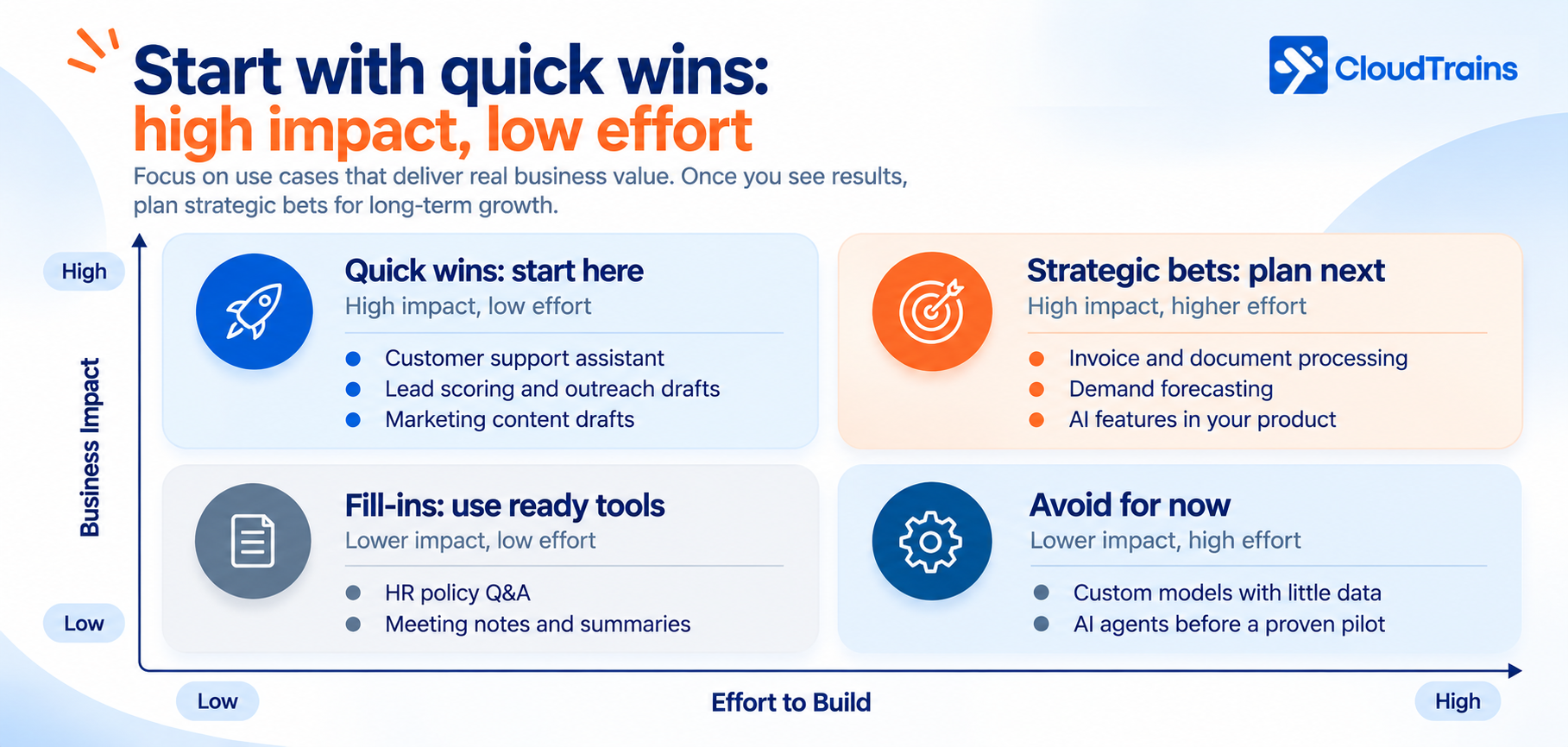
Start with quick wins to prove ROI and build internal confidence. Plan strategic bets once the first project has paid for itself. Use ready-made tools for fill-ins, and leave the bottom-right box alone until your data and experience catch up.
A strong first use case also passes three tests:
A clear success metric, such as "cut first response time from 6 hours to 30 minutes."
A low cost of mistakes, so an occasional wrong answer is caught by a person, not a customer.
9. AI Implementation Cost Breakdown (INR and USD)
AI implementation cost has two parts: a one-time build cost and a recurring running cost. Most budgets plan for the first and get surprised by the second.
What you actually pay for
Discovery and strategy: process mapping, use case selection, data audit and solution design.
Data preparation: cleaning, structuring and connecting the data AI will use. Often the most underestimated line item.
Development: building the AI logic, prompts, retrieval pipelines, user interface and admin controls.
Integration: connecting AI to your CRM, ERP, helpdesk, website or WhatsApp so its output becomes action.
AI model usage (API/token costs): you pay the model provider for every request, based on how much text goes in and out.
Cloud infrastructure: hosting, databases, vector storage and monitoring.
Testing, security and compliance: accuracy testing, guardrails, access control and data-protection requirements.
Maintenance and improvement: prompt updates, model upgrades, bug fixes and new features. Plan roughly 15–20% of the build cost every year.
Training and change management: teaching your team to use, trust and review the AI.
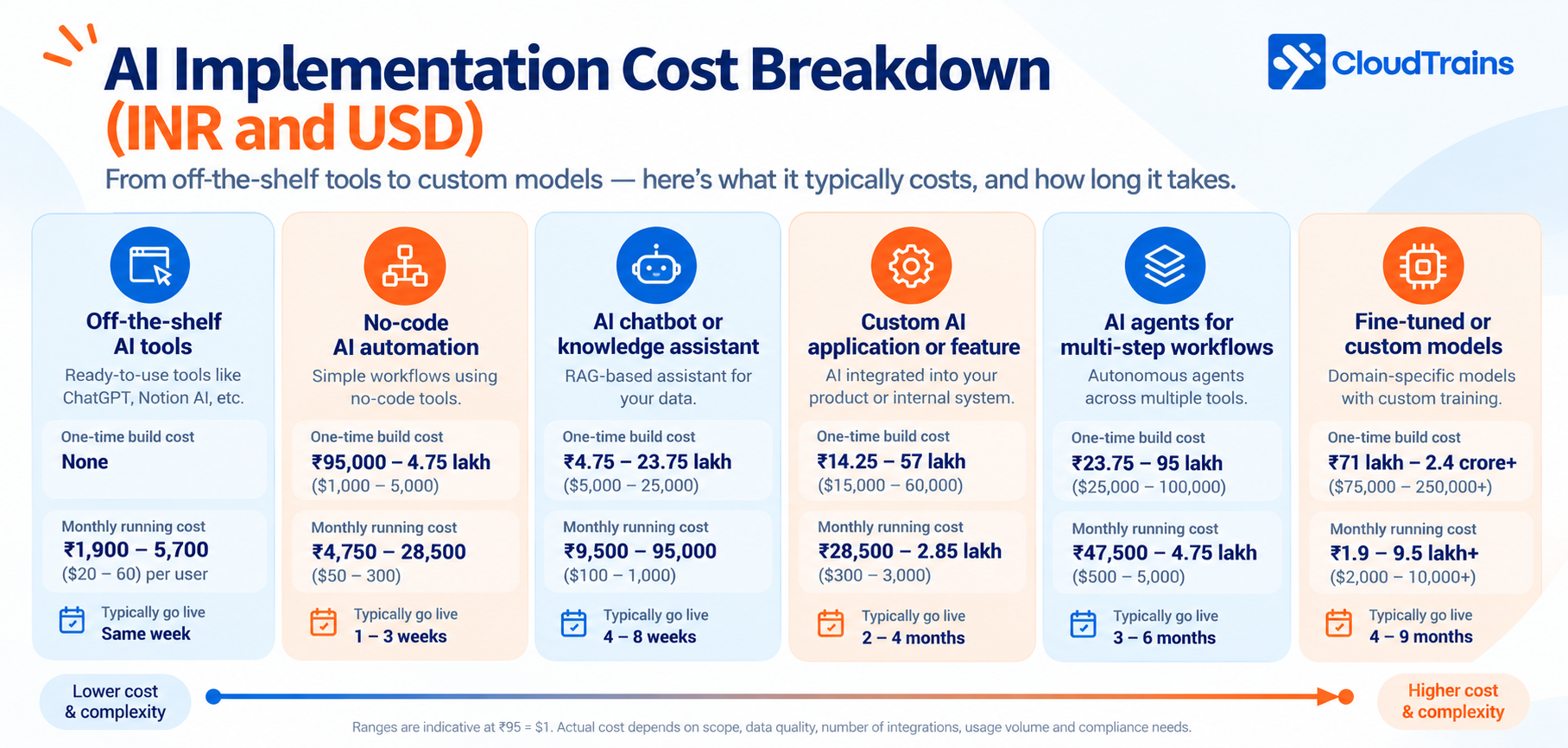
Indicative cost by solution type
Solution type | One-time build cost | Monthly running cost | Typical timeline |
|---|---|---|---|
Off-the-shelf AI tools | None | ₹1,900–5,700 per user ($20–60) | Same week |
No-code AI automation | ₹95,000–4.75 lakh ($1,000–5,000) | ₹4,750–28,500 ($50–300) | 1–3 weeks |
AI chatbot or knowledge assistant (RAG) | ₹4.75–23.75 lakh ($5,000–25,000) | ₹9,500–95,000 ($100–1,000) | 4–8 weeks |
Custom AI application or feature | ₹14.25–57 lakh ($15,000–60,000) | ₹28,500–2.85 lakh ($300–3,000) | 2–4 months |
AI agents for multi-step workflows | ₹23.75–95 lakh ($25,000–100,000) | ₹47,500–4.75 lakh ($500–5,000) | 3–6 months |
Fine-tuned or custom models | ₹71 lakh–2.4 crore+ ($75,000–250,000+) | ₹1.9–9.5 lakh+ ($2,000–10,000+) | 4–9 months |
Ranges are indicative at ₹95 = $1. Actual cost depends on scope, data quality, number of integrations, usage volume and compliance needs.
Hidden costs nobody quotes upfront
Usage growth: API bills rise with adoption. A tool used by 5 people in the pilot may be used by 200 after rollout.
Data clean-up: discovered mid-project, it can delay delivery and add to the budget.
Human review time: someone still checks high-risk outputs, at least in the early months.
Model changes: providers update or retire models, so prompts and tests need periodic rework.
Vendor lock-in: building tightly around one provider can make switching to a cheaper model expensive later.
Why the same project costs different amounts
The same AI chatbot can cost ₹5 lakh or ₹50 lakh. The difference comes from the number of systems it connects to, the quality of your data, how many languages and channels it supports, the accuracy level required, and the hourly rates of the team building it. Teams based in India typically deliver the same scope at a lower cost than equivalent teams in the US or UK, which is why many global businesses build with Indian AI engineering partners.
10. Ways to Reduce AI Implementation Cost
AI becomes a luxury when it is built like a research project. It becomes affordable when it is built like a product: right-sized, measured and optimised from day one.
Buy or configure before you build. Check whether an existing tool or API covers 80% of the need. Custom development should fill gaps, not reinvent what already exists.
Match the model to the task. Use smaller, faster and cheaper models for classification, routing, extraction and short replies. Reserve premium models for complex reasoning. This "model routing" is one of the biggest cost levers available.
Choose RAG over fine-tuning. Retrieval-augmented generation lets AI answer from your documents without retraining. It is cheaper to build, easier to update and keeps answers grounded in your data.
Cache repeated answers. Many questions repeat. Storing and reusing answers to common queries avoids paying for the same response again and again.
Batch what doesn't need to be instant. Reports, content drafts, data enrichment and lead research can run in scheduled batches, which providers usually price lower than real-time calls.
Consider open-source models. For high-volume or privacy-sensitive workloads, open-source models hosted on your own cloud can lower per-request cost and keep data in-house.
Optimise prompts. Shorter instructions, trimmed context and capped response lengths reduce the text you pay for on every call. Small savings per request add up quickly at scale.
Set usage limits and budgets. Per-user, per-feature and monthly spending caps stop runaway bills before they happen.
Monitor cost per feature. Track which features, teams and customers drive AI spend. What gets measured gets optimised.
Roll out in phases. Prove value with one team before rolling out to the whole company. Every phase must earn the next one.
11. How to Measure AI ROI
"We spend ₹2 lakh a month on AI" means nothing on its own. The right question is: what does each outcome cost now, compared with before?
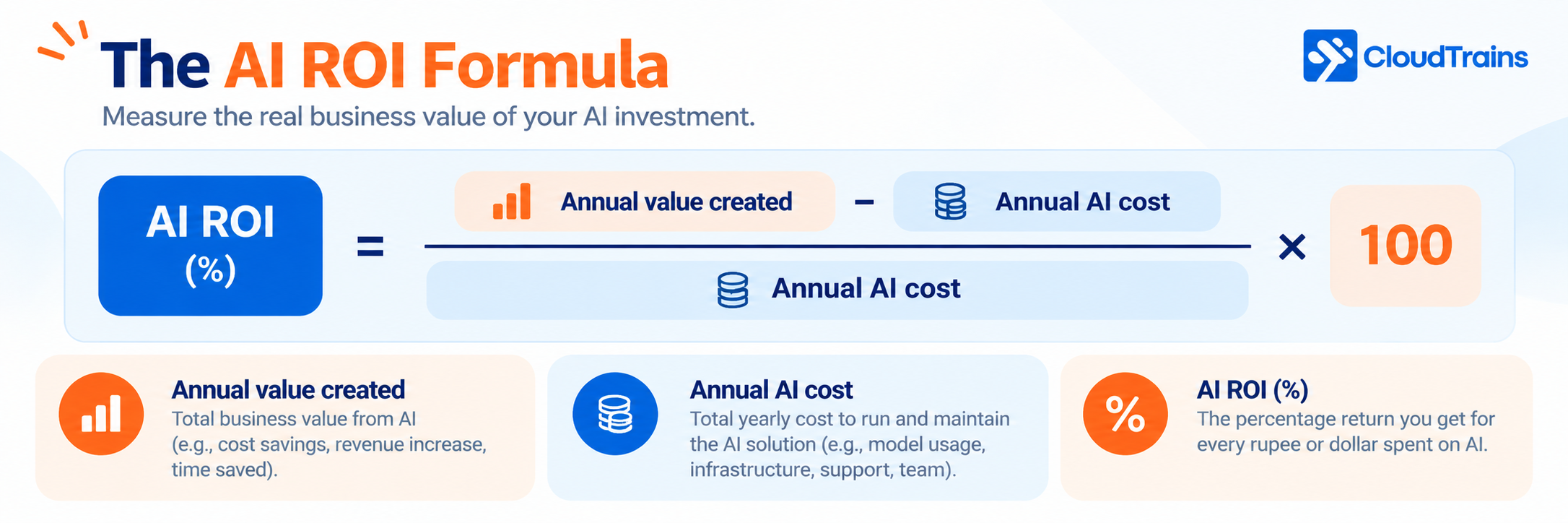
Annual value created = hours saved × loaded hourly cost + extra revenue + errors avoided.
Annual AI cost = build cost spread over its useful life + running costs + maintenance + human review time.
Example: AI support assistant for a mid-sized business
The numbers below are illustrative, to show the method.
Item | Before AI | After AI |
|---|---|---|
Support queries per month | 6,000 | 6,000 |
Queries resolved by AI | 0 | 3,600 (60%) |
Support agents needed | 8 | 4 |
Monthly agent cost at ₹35,000 each | ₹2,80,000 ($2,950) | ₹1,40,000 ($1,475) |
Monthly AI running cost | ₹0 | ₹40,000 ($420) |
Build cost spread over 24 months (₹12 lakh total) | ₹0 | ₹50,000 ($525) |
Total monthly cost | ₹2,80,000 ($2,950) | ₹2,30,000 ($2,420) |
In this example, the business saves ₹50,000 a month while the AI is being paid off, and about ₹1 lakh a month after month 24. Response times also drop from hours to seconds for most queries. The freed-up agents can move to sales or complex cases rather than leaving.
Metrics to track from day one
Cost per resolved query, processed document or qualified lead
Hours saved per week, per team
Accuracy or resolution rate
Adoption: percentage of the team actively using the tool
Customer satisfaction or response-time change
12. A 90-Day AI Adoption Roadmap
The cheapest way to adopt AI is in stages, where each stage must earn the next. The first 90 days take you from assessment to a proven pilot; scaling starts only after the numbers say it should.
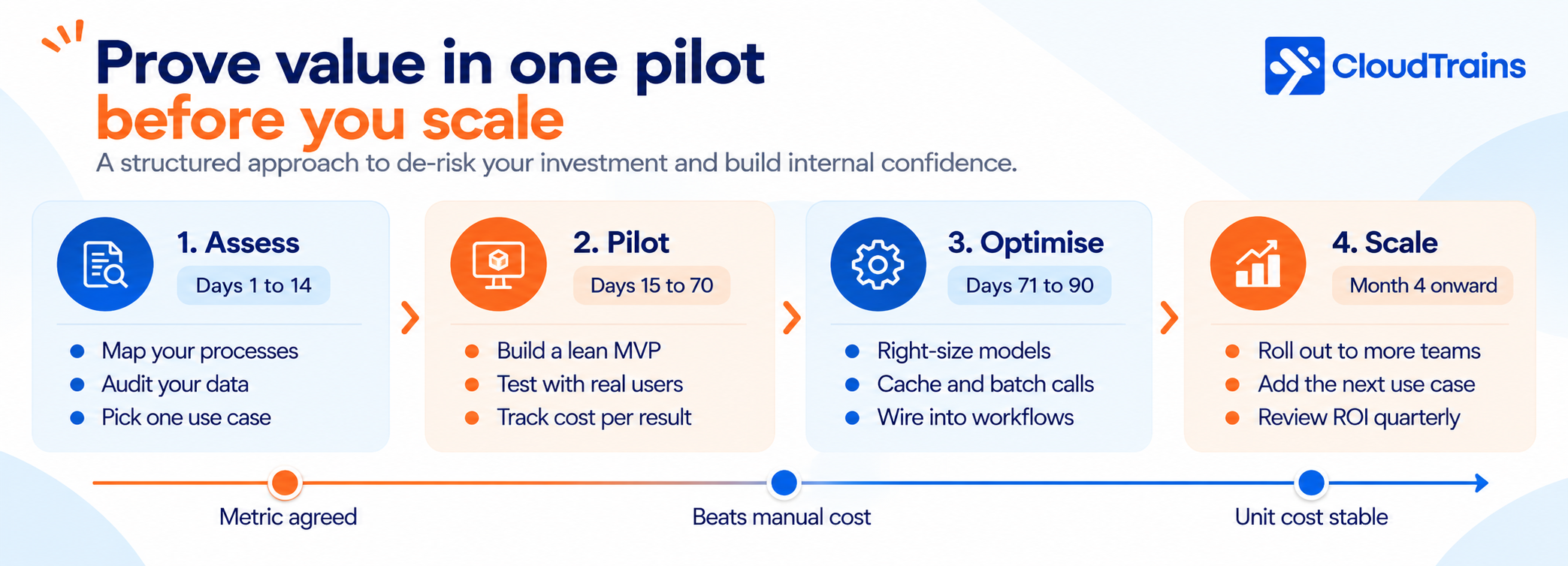
Days 1–14, Assess: map your top processes, audit the data, score readiness and pick one use case with a clear success metric.
Days 15–70, Pilot: build a lean MVP, connect it to one real workflow, test it with real users and track cost per outcome every week.
Days 71–90, Optimise: right-size models, add caching and batching, fix accuracy gaps and decide go or no-go.
Month 4 onward, Scale: roll out to more teams, add the next use case and review ROI every quarter.
Each gate in the diagram is a go or no-go decision. If a pilot does not beat the cost of the manual process, fix it or stop it before it becomes a permanent expense.
13. Choosing the Right AI Engagement Model: In-House, Project, Pod or Outcome-Based
The old question was simple: build an in-house team or outsource? In 2026 that choice is too narrow. AI-assisted engineering means a small, focused team can now ship what once needed a large one, and businesses increasingly expect to pay for results rather than hours. Four engagement models matter today.
1. In-house AI team
You hire your own AI engineers, data engineers and product people. You get full control and deep context, but you also carry 3–6 months of hiring time, full salaries from day one and the risk of building expertise from scratch.
2. Project-based partner
A partner delivers a defined scope for a fixed price, such as an AI chatbot or a document-processing workflow. It works well for clear, one-off builds, but scope changes mean renegotiation, and AI projects rarely stay fixed for long.
3. Dedicated AI pod
A pod is a small, cross-functional team that works as an extension of your business: typically an AI engineer, a full-stack developer, a data engineer, QA and a part-time product lead. You pay a predictable monthly fee, own the roadmap and scale the pod up or down as priorities change. Pods suit businesses with an evolving AI roadmap that need continuous development without the cost and delay of hiring.
4. Outcome-based model
You pay against agreed business results instead of effort, for example per resolved support query, per processed document or per qualified lead, or with part of the fee tied to hitting a KPI. The partner shares the risk, so incentives line up with yours. It needs a measured baseline, clear rules on how results are counted, and agreed minimum volumes and fee caps.
How the four models compare
Factor | In-house team | Project-based | Dedicated AI pod | Outcome-based |
|---|---|---|---|---|
Time to start | 3–6 months to hire | 2–4 weeks | 1–2 weeks | 2–4 weeks to agree baseline and KPIs |
How you pay | Salaries, benefits and tools | Fixed price per scope | Monthly fee per pod | Fee linked to results delivered |
Who carries the risk | You | Shared, limited to scope | Mostly you | Mostly the partner |
Flexibility | Low | Low once scope is fixed | High: scale up or down monthly | Medium: tied to agreed KPIs |
Skills coverage | Limited to who you hire | Matched to the project | Cross-functional team from day one | Whatever it takes to hit the outcome |
Best for | AI as a core, long-term capability | Well-defined, one-off builds | Evolving roadmaps and continuous AI development | Measurable use cases with a clear baseline |
Which model should you choose?
You have one clear, measurable use case: start outcome-based, so you pay only when AI delivers.
You have a fixed, well-understood requirement: go project-based.
You have a growing list of AI initiatives: a dedicated AI pod gives you speed and flexibility without hiring overhead.
AI is becoming your core product: build an in-house team, ideally with a pod or partner helping during the transition.
A practical path for 2026: prove value with an outcome-based or project-based pilot, scale with a dedicated pod, then build a small in-house core team once AI is central to your business, with the partner handing over code, documentation and knowledge along the way.
14. Common AI Implementation Mistakes to Avoid
Most AI budgets are not lost to bad technology. They are lost to a handful of predictable mistakes. Here is what each one looks like in practice, why it costs you, and how to avoid it.
1. Starting with the technology instead of the problem
What it looks like: "Let's build an AI chatbot" or "we need an AI agent" before anyone has asked which business problem it solves.
Why it's expensive: without a target, there is no way to judge success, so the project expands, timelines slip and the budget leaks into features nobody uses.
How to avoid it: write a one-line problem statement with a number in it, such as "reduce invoice processing time from 3 days to 4 hours," and choose the AI approach only after that.
2. Trying to automate everything at once
What it looks like: a roadmap with AI in sales, support, HR, finance and operations, all starting in the same quarter.
Why it's expensive: effort spreads thin, every team waits on the same engineers, and five half-built tools deliver less value than one finished one.
How to avoid it: pick one use case from the quick-wins box of the impact vs effort matrix, take it live, measure it, and let its results fund and justify the next one.
3. Ignoring running costs
What it looks like: a build budget is approved, but nobody estimates API usage, cloud hosting, monitoring or maintenance after launch.
Why it's expensive: running costs grow with adoption. A tool that costs little during a 10-user pilot can cost many times more once 500 people or thousands of customers use it daily.
How to avoid it: estimate cost per request and multiply by expected volume at full rollout. Set monthly budgets and usage alerts from day one, and plan roughly 15–20% of the build cost each year for maintenance.
4. Skipping the data audit
What it looks like: development starts, and halfway through the team discovers that customer records are duplicated, documents are outdated or key data sits in someone's personal spreadsheet.
Why it's expensive: AI is only as good as the data behind it. Fixing data mid-project delays delivery, adds unplanned cost and produces inaccurate answers that damage trust.
How to avoid it: spend the first one to two weeks auditing data: where it lives, how complete and current it is, who owns it and whether you are legally allowed to use it.
5. Removing humans too early
What it looks like: AI goes straight from pilot to sending replies, approving refunds or updating records without anyone checking its output.
Why it's expensive: a single wrong answer to a customer, a wrong refund or a compliance error can cost more than the AI saves in a month, and the reputational damage lasts longer.
How to avoid it: start with AI drafting and humans approving. Reduce review gradually, only for tasks where measured accuracy is consistently high, and always keep human review for legal, financial and medical decisions.
6. Not training the team
What it looks like: the tool launches with a single announcement email, and three months later most of the team has quietly gone back to the old way of working.
Why it's expensive: an AI tool nobody uses has a return of zero. Teams resist what they don't understand, or fear it will replace them.
How to avoid it: involve end users during the pilot, run hands-on training, explain clearly what the AI will and won't do, name internal champions in each team, and track adoption as a core metric.
7. Locking into one vendor
What it looks like: prompts, workflows and data are built so tightly around one AI provider or platform that switching would mean rebuilding from scratch.
Why it's expensive: AI model prices and capabilities change every few months. If you cannot switch, you cannot take advantage of cheaper or better models when they arrive.
How to avoid it: build a thin layer between your application and the model so providers can be swapped, keep your data and prompts in your own systems, and make sure you own the code and IP.
8. Measuring activity instead of outcomes
What it looks like: monthly reports celebrate "50,000 AI queries handled" or "200 employees using the tool."
Why it's expensive: activity numbers can rise while the business gets no better. Without outcome metrics, you cannot tell whether to scale, fix or stop.
How to avoid it: track business outcomes, such as cost per resolved query, hours saved per week, error rate and revenue influenced, against the baseline you recorded before launch.
15. Frequently Asked Questions
How much does AI implementation cost for a small business?
A focused first project, such as an AI chatbot or knowledge assistant on your own data, typically costs ₹4.75–23.75 lakh ($5,000–25,000) to build, plus ₹9,500–95,000 ($100–1,000) a month to run. Simple no-code AI automation can start under ₹1 lakh ($1,050).
How do I know if my business is ready for AI?
You are ready if you have a repetitive, high-volume task, digital processes, usable data, a clear metric to improve, a business owner for the project and budget for a 60–90 day pilot. The AI readiness scorecard earlier in this guide gives you a score out of 14.
Which business area should I automate with AI first?
Start where volume is high and mistakes are cheap to catch: customer support, lead qualification, document processing and content drafting usually return value fastest.
Is it cheaper to build a custom AI model or use an existing one?
Using existing models through APIs, combined with RAG on your data, is far cheaper for most businesses. Custom or fine-tuned models make sense only for specialised tasks with large, high-quality datasets.
How long does it take to implement AI in a business?
A no-code automation can go live in 1–3 weeks, an AI assistant in 4–8 weeks and a custom AI application in 2–4 months. Plan 90 days to move from assessment to a proven pilot.
What are the ongoing costs of AI after launch?
Model API usage, cloud hosting, monitoring, maintenance (roughly 15–20% of the build cost each year) and time for human review of sensitive outputs.
How can I reduce AI costs without losing quality?
Route simple tasks to smaller models, use RAG instead of fine-tuning, cache repeated answers, batch non-urgent jobs, optimise prompts and set usage limits.
Should I hire an in-house AI team or work with a partner?
For a first, measurable use case, an outcome-based or project-based partner is usually faster and lower-risk. For an ongoing AI roadmap, a dedicated AI pod gives flexibility without hiring overhead. Build an in-house team once AI becomes a core, long-term part of your product.
How do I choose the right AI development company?
Most vendors can show a polished demo. Far fewer can run AI reliably in production, at a predictable cost, with your data protected. Use this checklist in your evaluation calls; a strong partner should answer every point with specifics, not promises.
Architecture before code. Do they produce a system design covering scale, data flow, security and AI cost before development starts? Ask to see a sample architecture document.
LLM cost and latency engineering. Can they show how they track cost per request, route tasks between models, cache responses and set budget alerts? Ask what a past client's AI bill looked like before and after optimisation.
Model-agnostic design. Do they build a layer that lets you switch between providers such as OpenAI, Anthropic, Google or open-source models without rewriting your product? Direct partnerships with leading model providers are a plus.
Evaluations and guardrails. How do they test AI accuracy before launch and after every change? Look for automated eval suites, hallucination checks, prompt-injection protection and human-review workflows for high-risk outputs.
Production-grade RAG experience. Ask how they handle chunking, retrieval quality, permissions on sensitive documents and keeping the knowledge base current. Retrieval quality decides answer quality.
Agent and integration depth. Can they connect AI agents safely to legacy ERP, CRM and internal systems, with clear limits on what the agent is allowed to do?
Prototype-to-production capability. If you already have an AI-built or no-code prototype, can they harden it into secure, scalable production code instead of throwing it away?
Private and sovereign AI options. Can they deploy models in your own cloud or region when data cannot leave your environment or country?
Compliance built in. Do they design for the regulations that apply to you, such as GDPR, HIPAA, SOC 2, India's DPDP Act, UAE PDPL or the EU AI Act, with audit trails for AI decisions?
Full ownership. Are code, IP, data, prompts and cloud accounts set up in your name from day one, under NDA?
Speed to a working prototype. Can they show a clickable working prototype within days, not after weeks of discovery?
Flexible engagement models. Do they offer project-based, dedicated pod and outcome-based options, so the contract can evolve with your roadmap?
Multi-market experience and timezone overlap. Have they shipped for businesses in your markets, and does their team overlap with your working hours?
Verified track record. Can they share live products, independent client reviews and references you can speak to?
Partnership after launch. Do they offer monitoring, model upgrades, cost reviews and improvement cycles, or does the engagement end at delivery?
If a vendor struggles with the cost, evaluation and ownership questions, treat that as the clearest warning sign. Those are the areas where AI implementations most often go wrong.
16. Conclusion: Make AI an Investment, Not a Luxury
AI is expensive when it is adopted for its own sake. It is affordable when it targets one measurable problem, uses the right-sized solution, and is wired into the way your business already works.
The winning sequence is simple: check readiness, pick one high-value use case, pilot it with a clear metric, optimise the cost per outcome, then scale what works.
Not sure where AI fits in your business, or what it should cost? CloudTrains Global builds AI products and automation for businesses across India, the UAE, the UK and the USA. As a Microsoft and NVIDIA Technology Enabler Partner, we help you find the use case with the fastest return and build it to run lean from day one. Book an AI readiness call with our team.